TL;DR
Placement matters more than volume. A few relevant Shopify trust badges near the product decision, cart, checkout button, or policy details usually feel more trustworthy than a long badge wall.
Match the badge to the doubt. Use payment/security cues for payment anxiety, delivery cues for shipping uncertainty, returns badges for risk, and reviews or guarantee cues for product confidence.
Product pages and carts deserve the most attention. These are the moments where shoppers are deciding whether to continue, so Shopify store trust badges should be close to the price, add-to-cart button, checkout button, or key policy copy.
Keep official and third-party claims honest. Shopify provides guidance for security badges and official branded badges, but merchants should not use fake seals, outdated certifications, or badges that imply guarantees they do not actually offer.
One image slot is intentionally empty. The product-page placement section includes a clear empty image placeholder where the future Snapp trust badge example can be inserted.
What are Shopify trust badges?
Shopify trust badges are small visual cues that help shoppers understand why a store, product, checkout, or policy feels safe enough to continue. They can be simple icon blocks, payment logos, security badges, shipping promises, return-policy badges, guarantee badges, review or rating cues, sustainability badges, support badges, or official Shopify program badges.
Shopify’s own 2026 trust badge guide describes trust badges as digital icons that store owners display to increase customer trust and highlight business practices or policies. It also notes that Shopify offers branded badges such as Shop Promise, Shopify Planet, and Shopify Secure, while merchants can also use apps to add payment icons, policy badges, endorsement badges, and custom trust blocks. See Shopify’s trust badge guide.
For a Shopify merchant, the practical question is not “Which badge can I add?” It is “What uncertainty is stopping this shopper from moving forward?” The best trust badges for Shopify stores do not decorate the page. They clarify the next step: payment is safe, shipping is clear, returns are fair, support exists, the store is legitimate, and the offer matches the shopper’s expectations.
That is why this article focuses on placement. Trust badges for Shopify stores are strongest when they appear near the moment of hesitation. A payment badge below a buy button can feel helpful. The same badge buried in a footer may be easy to miss. A returns badge near a sizing-sensitive product can lower risk. The same badge repeated seven times can make the page feel noisy.
Why placement matters more than adding more badges

A shopper does not experience a Shopify store as one long page of information. They experience it as a sequence of decisions: Should I trust this brand? Is this product right for me? What will shipping cost? Can I return it? Is checkout safe? Can I pay the way I want? Each decision creates a different kind of doubt, and each doubt needs a different cue.
Baymard’s cart abandonment research shows why this matters. After excluding shoppers who were only browsing, Baymard reports that 19% of US online shoppers abandoned because they did not trust the site with credit card information, 15% because the returns policy was not satisfactory, 14% because they could not see or calculate total order cost up front, and 10% because there were not enough payment methods. Those are not all the same problem. They require different reassurance in different places. See Baymard’s cart abandonment statistics.
This is also why “more badges” can backfire. If a page shows a dense row of generic seals, shoppers may read it as overcompensation. The badge row starts competing with the product, the price, the reviews, and the call to action. Better placement means using the smallest useful trust cue in the highest-friction spot.
Good placement feels like help: “Here is the delivery promise before you decide.”
Bad placement feels like decoration: “Here are twelve icons because trust is important.”
Risky placement feels suspicious: “Here is a security seal that does not explain who verifies it or what it means.”
Where to place Shopify trust badges

The most useful trust badge placement map follows the shopper journey. Start with broad credibility on early pages, then move more specific reassurance closer to checkout. This keeps the store clean while still answering practical concerns.
Shopper doubt | Best badge or cue | Best placement | Avoid |
|---|---|---|---|
Can I trust this store? | Secure checkout, contact/support, review proof, policy clarity | Homepage, header/footer, product page trust row, About or policy pages | A wall of generic seals with no supporting detail |
Is payment safe and familiar? | Payment icons, secure checkout copy, Shopify Secure badge where appropriate | Near add-to-cart, cart checkout button, payment step, footer baseline | Showing unavailable payment methods or treating payment logos as security certifications |
When will my order arrive? | Shipping speed, tracking, free shipping threshold, Shop Promise if eligible | Product page, cart, shipping policy, announcement or banner areas | Hiding delivery details until late checkout |
What if it does not work for me? | Returns, exchange, money-back guarantee, warranty promise | Product page near price or variant selector, cart, returns policy | Vague “risk free” copy without the policy details |
Is the product good? | Reviews, ratings, testimonials, quality guarantee, product benefit icons | Near product title, above/below add-to-cart, near reviews, comparison sections | Using fake reviews or moving proof so far down the page that shoppers miss it |
Can I get help? | Support hours, chat availability, contact options, FAQ link | Product page, cart, footer, support/help pages | Making shoppers hunt for support after a question appears |
Use this table as the core placement system for Shopify store trust badges. A badge earns its space when it answers one of these doubts clearly. If it does not answer a doubt, remove it or move it to a lower-priority area.
Product page placement: where trust badges matter most

For most stores, the product page is the most important placement for Shopify trust badges. This is where the shopper is evaluating the offer, reading the price, checking images, choosing variants, and deciding whether to add the item to cart. The trust row should support that decision without distracting from it.
The strongest product-page placements are near the product form: under the add-to-cart button, below the price, near shipping or returns microcopy, beside product benefit icons, or just above the reviews section. The exact spot depends on the theme, but the rule stays the same: place trust badges close enough to answer hesitation before the shopper leaves the decision area.
Below the add-to-cart button: best for secure checkout, accepted payment methods, easy returns, and guarantee cues.
Near the price: best for financing, payment options, free shipping thresholds, or value-based reassurance.
Near product benefits: best for quality promises, materials, sustainability, durability, or warranty badges.
Near reviews: best for social proof, verified review badges, and customer satisfaction cues.
The product page is also the best place to use Snapp naturally. Snapp Trust Badges & Icons is built to help Shopify merchants add payment processors, shipping guarantees, icons, custom badges, templates, and on-brand trust blocks without editing theme code. Snapp’s product page highlights use cases such as adding trust icons below the add-to-cart button, reinforcing payment trust near checkout, and visualizing policies across the site. See Snapp Trust Badges & Icons.
For specific trust cues, see secure checkout badges and free shipping badge placement.
Cart and checkout-adjacent placement
The cart is where broad product interest turns into purchase intent. Trust badges here should be tighter and more practical than product-page badges. Shoppers are usually asking: What is the total? Is shipping clear? Can I pay safely? Can I return it? Will checkout be easy?
A cart drawer or cart page can use a compact reassurance row near the checkout button. Good cues include secure checkout, accepted payment methods, free shipping threshold, delivery estimate, easy returns, or support availability. Keep the row short. The cart already has totals, items, discounts, quantity controls, and checkout buttons competing for attention.
Checkout itself is more restricted. Shopify’s theme documentation says security badges are often included in the footer or near the Add to cart button, but merchants cannot add a security badge to the checkout page unless they are on Shopify Plus with access to checkout.liquid. See Shopify’s security badge documentation. For most Shopify stores, this means the best controllable trust badge placements are before checkout: product page, cart drawer, cart page, footer, and policy pages.
Baymard’s payment UX guidance also warns against presenting too many payment options at once, because long rows of payment logos can create visual noise and make users scan too much. That applies to cart badge rows too. If the store accepts many methods, highlight the most relevant ones and keep the rest for checkout. See Baymard’s payment UX guidance.
Use cart badges to reassure, not sell again. The shopper has already chosen the product; now remove risk.
Keep checkout-adjacent copy precise. “Secure checkout,” “Easy 30-day returns,” and “Tracked shipping” are stronger than vague “trusted store” claims.
Do not promise what checkout cannot deliver. If payment methods, delivery times, or returns vary by region, make the badge wording accurate.
Footer, homepage, and policy page placement
Footer trust badges are useful, but they should act as a baseline, not the entire strategy. A footer can show accepted payment methods, secure checkout language, certifications, policy links, customer support links, and business information. This helps shoppers who scan for legitimacy, especially on unfamiliar stores.
The homepage has a different job. It should establish who the store is and why shoppers should continue. Use broad credibility cues: shipping promise, review snippets, guarantee, support availability, press or third-party proof if real, and a clear route to policies. Avoid turning the homepage into a badge collection.
Policy pages are where badges become proof. A return badge on a product page should link or point to the actual returns policy. A shipping badge should be supported by a shipping page or delivery FAQ. A guarantee badge should match the conditions on the guarantee page. This matters because badges can create confidence only when the details back them up.
Footer: store-wide credibility and quick links.
Homepage: brand-level confidence and reasons to keep browsing.
Policy pages: the proof behind the promise.
Match each badge to a specific shopper doubt
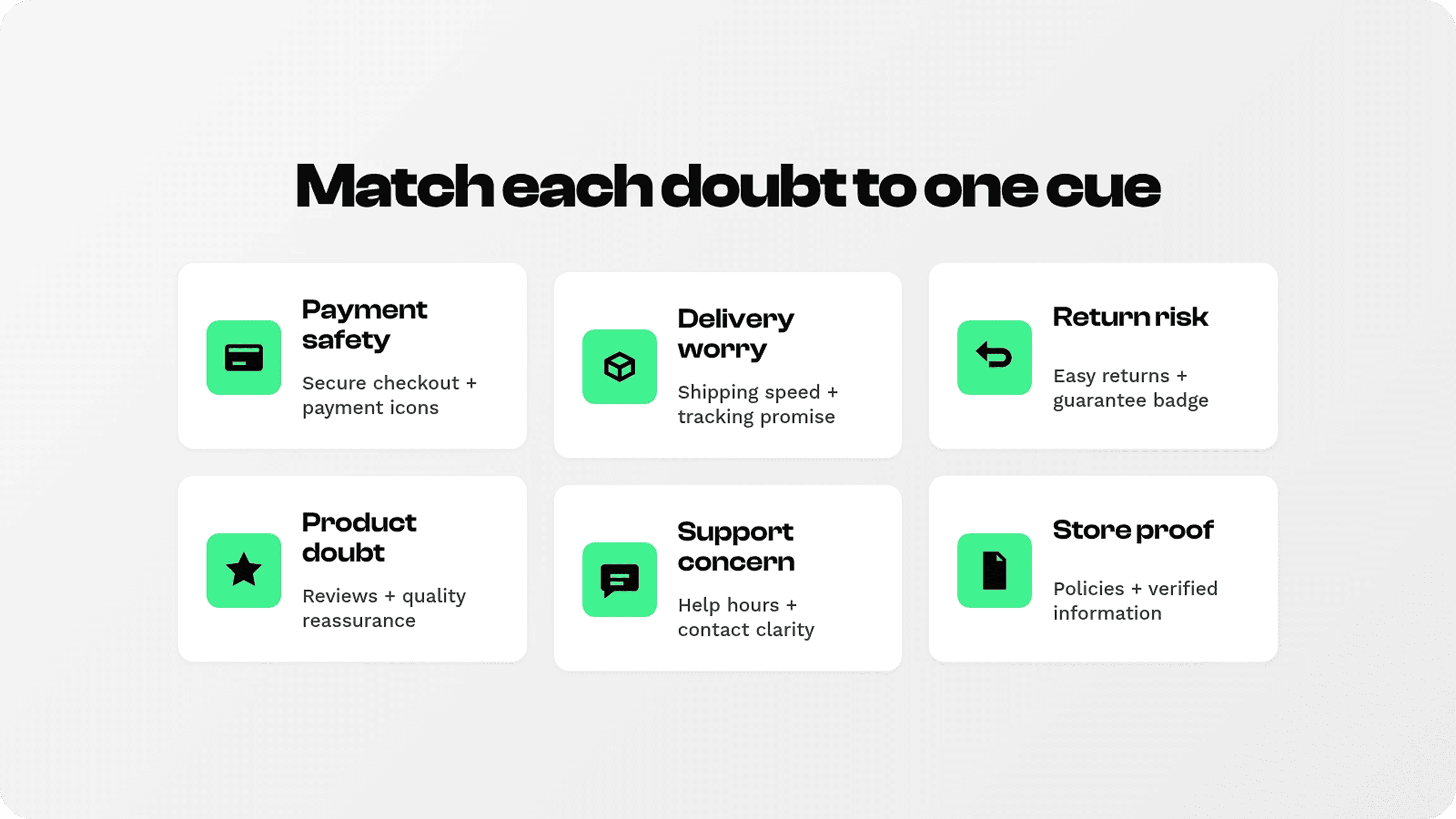
The best trust badges Shopify merchants can add are not always the most famous logos. They are the cues that match the store’s real friction. A high-ticket furniture store may need delivery, returns, and financing reassurance. A skincare store may need ingredient, guarantee, and review proof. A digital product store may need secure payment, instant access, and support availability.
Before adding badges, audit the questions shoppers ask before buying. Look at product-page behavior, cart abandonment, support tickets, live chat questions, post-purchase complaints, and review language. If shoppers keep asking about delivery time, do not lead with a generic lock icon. If shoppers ask whether returns are free, do not hide the returns badge in the footer. If shoppers worry about payment safety, place security and payment reassurance close to the checkout path.
This “doubt first” approach also helps avoid keyword-stuffed badge blocks. Instead of trying to display every possible trust badge for Shopify, each placement gets a job. Product-page badges answer product and buying doubts. Cart badges answer checkout risk. Footer badges answer store legitimacy. Policy pages answer detail questions.
How to add trust badges to Shopify
1. Use official Shopify badges when eligible
Some Shopify trust badges come from Shopify programs or platform-level standards. Shopify’s trust badge guide lists official branded badges such as Shop Promise, Shopify Planet, and Shopify Secure. Eligibility, placement, and activation depend on the specific program and store setup, so merchants should follow Shopify’s current instructions rather than copying badge images manually.
2. Use your theme where it makes sense
Themes may include built-in areas for payment icons, footer badges, security badges, or text/icon blocks. Theme settings are a good starting point for broad placements like footer payment methods or homepage reassurance. The limitation is flexibility: theme settings may not give you the exact product-page or cart placement you want.
3. Use a trust badge app for flexible storefront placement
A dedicated app is usually the most practical choice when you want badges near add-to-cart buttons, below product benefits, in cart drawers, or across selected product groups. Apps can help with icon libraries, spacing, color matching, mobile behavior, and placement rules without direct theme editing.
Snapp’s Shopify App Store listing says it helps merchants add trust badges, banners, payment icons, and crypto icons that match the brand without editing theme code, and that it is built as a Theme App Extension. See the Snapp Shopify App Store listing. Snapp’s help center also notes that merchants should enable the app embed for badges to function and can control spacing, typography, icon size, and icon color in badge styling. See Snapp’s badge styling guide and app embed troubleshooting guide.
4. Use custom code only when you can maintain it
Developers can add custom Liquid snippets, app blocks, or theme sections for specific badges. This can be useful for highly custom layouts, but it also creates maintenance risk. Payment options, shipping policies, app embeds, theme files, and checkout rules can change. If custom code creates stale or inaccurate badges, it hurts trust instead of helping it.
Common mistakes with trust badges Shopify merchants should avoid
Adding too many badges. A dense badge row can look less credible than a focused set of three or four relevant cues.
Using fake or unverifiable security seals. If a badge suggests certification, compliance, or third-party verification, the store should be able to prove it.
Showing badges far from the decision. Footer badges help, but they cannot answer every product-page or cart hesitation.
Making badges louder than the CTA. Badges should support the add-to-cart or checkout button, not compete with it.
Ignoring mobile spacing. A beautiful desktop row can wrap badly on mobile if icons, labels, and spacing are not tested.
Using vague claims. “Trusted store” is weaker than a specific promise like “30-day returns” or “Secure checkout.”
Letting badges go stale. Update badges when policies, payment methods, regions, shipping speeds, guarantees, or support hours change.
The safest rule is simple: if the badge would make a shopper expect something, the store must actually deliver it.
How Snapp can help place Shopify store trust badges
Snapp is a good fit when the store needs flexible, on-brand confidence cues but does not want to rebuild the theme. The product use case is strongest on product pages and carts, where merchants often want a clean row of secure checkout, shipping, returns, guarantee, support, or payment icons close to the buying action.
For merchants comparing Shopify apps to increase sales, trust badge tools are most useful when they make a real customer concern clearer, such as payment safety, delivery expectations, returns, or product quality.
A practical Snapp setup might look like this:
Product page: secure checkout, accepted payments, free shipping, easy returns, and product-specific quality cue below add-to-cart.
Cart: secure checkout, easy returns, tracked shipping, and support availability near the checkout button.
Footer: accepted payment methods, policy links, and broad credibility cues.
Policy pages: icons that reinforce the details instead of replacing them.
This keeps Snapp from becoming “more icons everywhere.” The goal is a reusable trust system: each placement has a reason, each badge has a job, and the visual style feels native to the store.
Final placement checklist
Use this checklist before publishing Shopify trust badges on a live store.
Can each badge be tied to a real shopper doubt? If not, remove it.
Is the badge close to the decision it supports? Product doubts belong near product decisions; payment doubts belong near checkout actions.
Is the claim specific and true? Avoid vague trust copy and unsupported certifications.
Does the badge row work on mobile? Check wrapping, spacing, icon size, and text readability.
Does the badge link or point to supporting details when needed? Returns, shipping, warranty, and guarantee claims need policy support.
Is the row visually secondary to the CTA? Badges should increase confidence, not distract from buying.
Will someone maintain it? Review badges whenever policies, payments, apps, or markets change.
Final recommendation
Use Shopify trust badges as confidence cues, not decoration. Start with the shopper’s doubt, choose the smallest badge set that answers it, and place the badges close to the decision they support. Product pages and carts usually deserve the most attention; footers and policy pages support credibility in the background.
If you only need a basic footer row, your theme may be enough. If you want product-page, cart, and custom placement without editing code, Snapp gives merchants a cleaner way to add Shopify store trust badges, payment icons, and policy cues where shoppers actually look.
The best trust badges for Shopify are not the loudest. They are the ones that make the next step feel clear, safe, and worth taking.